FanPilot icon

Quiet, safe fan control
for your Linux desktop

Motherboard fans and the graphics card in one simple app that follows your desktop theme. Drag a curve, pick a profile, and FanPilot hands everything back to the BIOS if anything goes wrong.

Linux · systemd GPL-3.0-or-later Python ≥ 3.10 216 automated tests
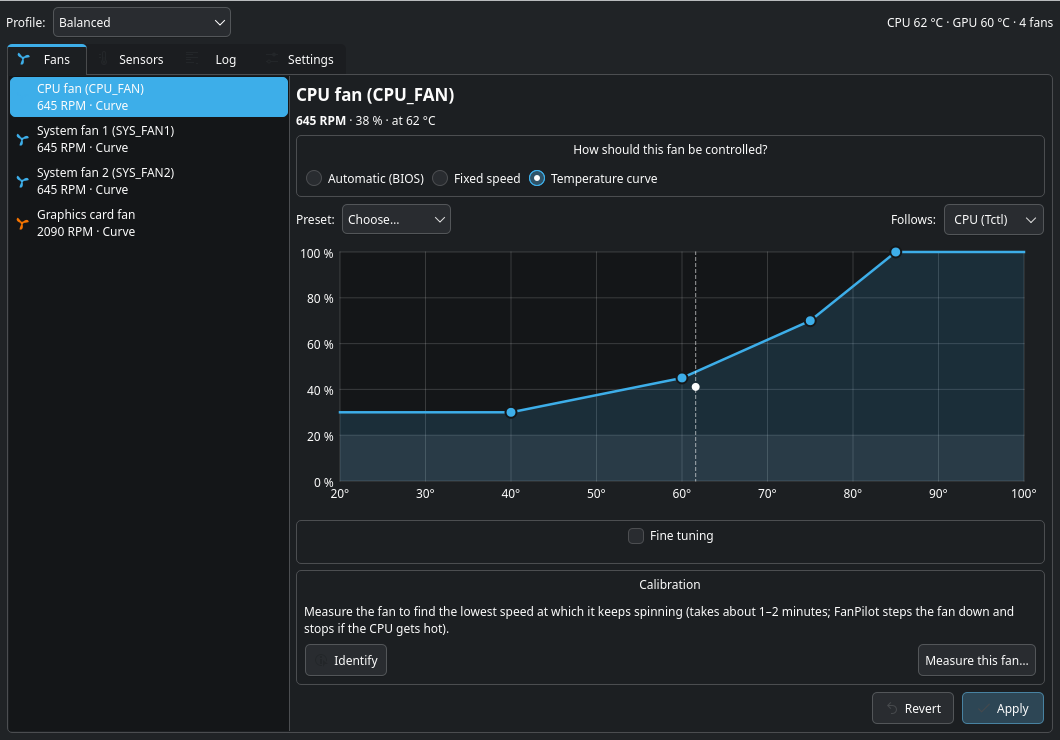
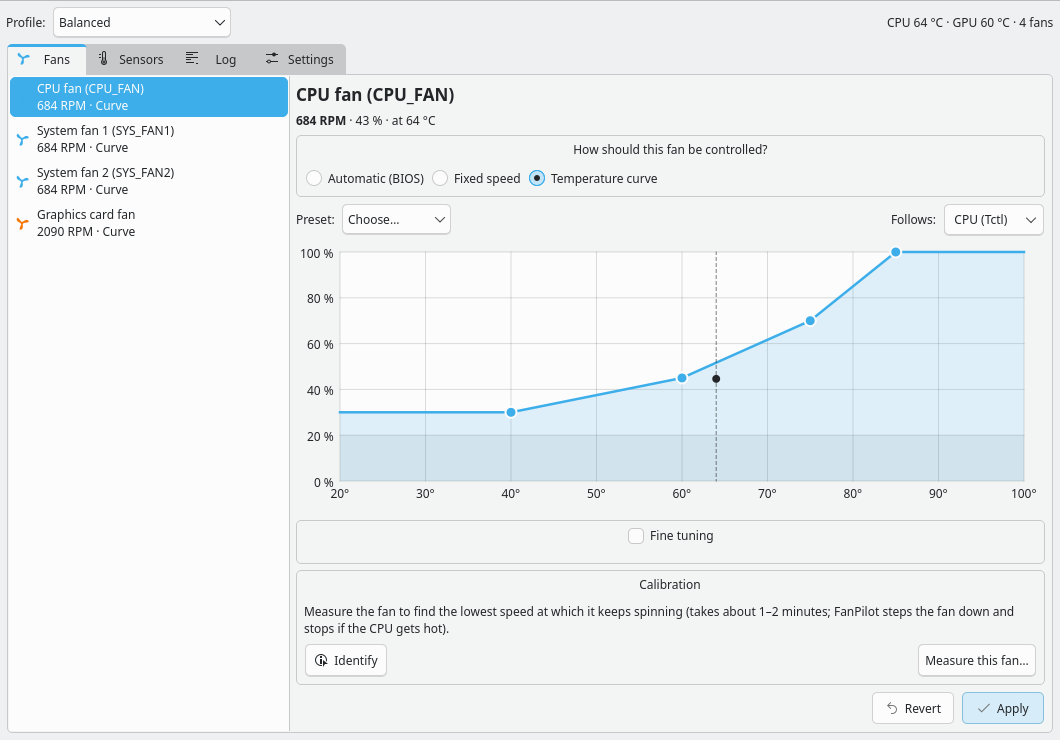
FanPilot main window with the CPU fan curve editor

What it is

FanPilot is a fan controller for Linux desktops. A small root service (Python standard library only) drives the motherboard's fan headers through the kernel's hwmon drivers and the graphics card's fan through its own interface, and an ordinary desktop app with a tray icon lets you choose Automatic, a fixed speed or a temperature curve for every fan. It names the headers the way the board does where it knows the board, warns you when a fan stalls, and hands every fan back to the BIOS or the card's firmware whenever it stops, crashes or is killed. A fresh install changes nothing: every fan starts on Automatic.

🔌

Driver helper

For boards with an ITE chip, one script sets up the it87 driver (DKMS, rebuilt on kernel updates). Every step is printed and can be undone.

🏷️

Real names

On boards FanPilot knows: CPU_FAN, SYS_FAN1, ... instead of pwm2 and temp5. Rename anything yourself.

🎮

GPU too

AMD RX 7000 / 9000: the fan curve is written into the card's own firmware.

🛟

Fail-safe

Starts on Automatic and changes nothing until you choose. Hands everything back on any failure.

Features

Simple by default, detailed when you want it.

📈 Drag-and-drop fan curves

Each fan can be Automatic (BIOS or card decides), a fixed speed, or a temperature curve.

  • Drag points; double-click to add one, right-click to remove one
  • A live marker shows the current temperature and speed
  • Case fans can follow the hotter of CPU and GPU, so they also help while the GPU is busy
  • Fine tuning: lowest speed, allow stop, smoothing, ramp limits
Curve editor in the light theme

🎮 Graphics card curve in firmware

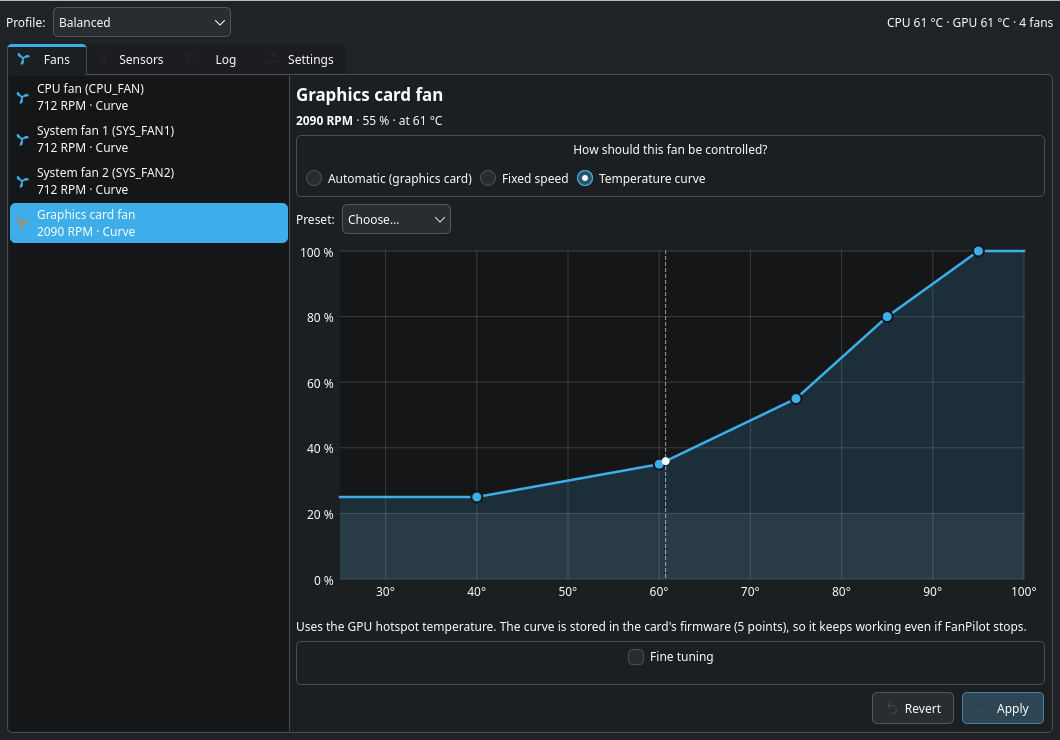
For AMD RX 7000 / 9000 cards with OverDrive enabled, FanPilot writes your curve into the card itself, so the card runs it without polling; when FanPilot stops, the card goes back to its own control. Zero-RPM (fan off when cool) is your choice.

  • Follows the GPU hotspot temperature
  • Every write is read back and checked
  • Automatic hands control straight back to the card
Graphics card fan curve

🎛️ Profiles, limits and a one-click self-test

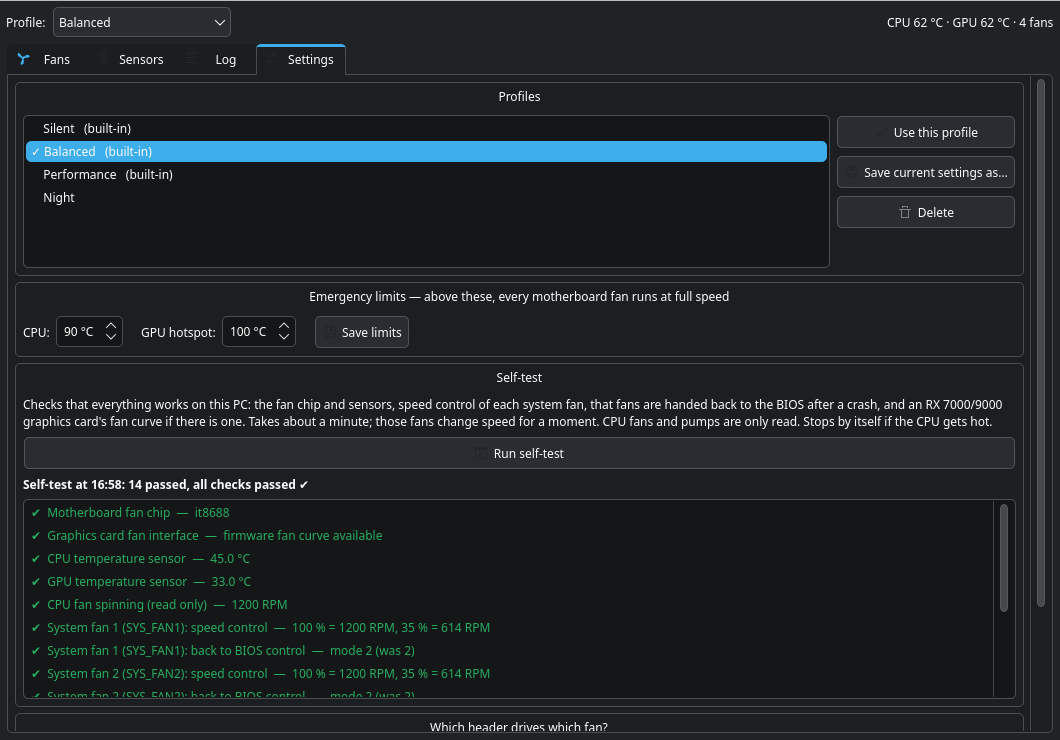
Silent, Balanced and Performance are built in, and you can save your own. Switch from the top of the window, from the tray icon, or from the command line.

  • Self-test button: ✔/✖ for the chip, sensors, speed control, crash recovery and GPU curve (about 45 s, no password)
  • Emergency limits: above them every fan runs at full speed, the graphics card's too
  • Built-in profiles keep each fan's measured lowest speed
Profiles, emergency limits and self-test results

📋 Every sensor, HWiNFO-style

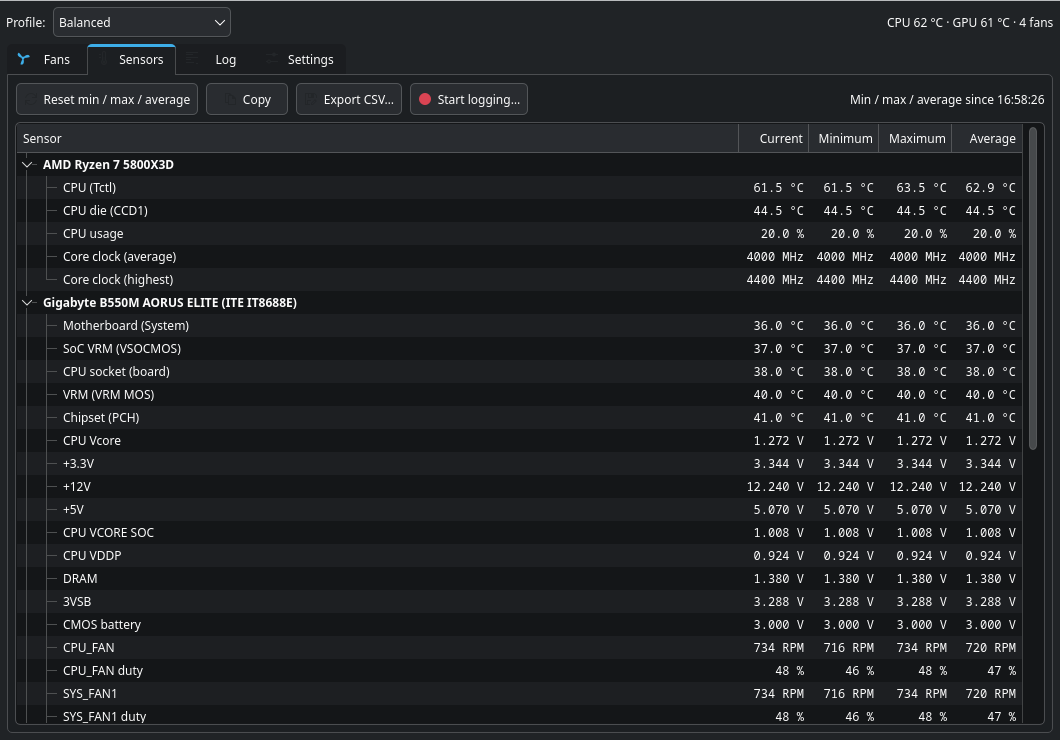
One table grouped by device: CPU, motherboard, graphics card and drives. Temperatures, voltages, clocks, power, load and fans, each with Current, Minimum, Maximum and Average. Values past a limit turn red. Reset, copy, export or log to CSV.

HWiNFO-style sensors table
🔍

Identify

Runs one header slow for 3 s, then at full speed for 3 s, so you can see or hear which physical fan it is.

📏

Calibration

Measures where each fan stops and restarts, then never asks for less than that.

🗺️

Map my fans

Finds which header drives which fan and hides headers with nothing connected (about 15 s per header).

🚨

Stall warning

Desktop alert (while the app or tray runs) if a fan stops while it should spin.

🖥️

Feels native

Follows your desktop theme (light/dark), lives in the tray, and only one copy runs at a time.

🔔

Your own alarms

Right-click any sensor: get a desktop notification when it goes above or below your value.

🔢

Value on the tray

Right-click any sensor → Show on tray icon: that number sits in your panel.

📄

Sensor file

/run/fanpilot/sensors.tsv (in RAM, rewritten once a second) for other programs, e.g. the Logitech G510 keyboard LCD app.

💾

Backup & restore

fanpilotctl config > my-fans.json and fanpilotctl import my-fans.json.

Supported hardware

FanPilot only writes to drivers it knows to be controllable. Everything else is shown read-only.

Motherboard fan chips

DriverTypical boards
ITE it87 (in-tree, or the newer frankcrawford/it87)most Gigabyte, some ASRock and older boards
Nuvoton nct6775 familymost ASUS, many MSI and ASRock boards
Nuvoton nct6687 (nct6687d, out-of-tree)newer MSI boards
Fintek f71882fg family
Winbond w83627ehf family
Read-only: nct6683, asus-ec-sensors, asus_wmi_sensors, gigabyte-wmi, hp-wmi-sensors, any other chipshown in the Sensors tab, never written to

Boards FanPilot knows get the headers' printed names (CPU_FAN, SYS_FAN1, ...). Any other board works generically ("Fan 1", "Fan 2", ...), and every motherboard fan gets the CPU fan's protection until you tell FanPilot which one the CPU fan is.

Graphics cards

CardWhat FanPilot does
AMD RX 7000 / 9000 with OverDriveTemperature curve stored in the card's firmware (5 points), zero-RPM optional
AMD RX 7000 / 9000 without OverDriveShown read-only, with a hint: add the OverDrive bit (0x4000) to the amdgpu.ppfeaturemask kernel parameter
AMD up to RX 6000Beta: controlled like a motherboard header; handed back to the card on every exit
NVIDIA (proprietary driver)Read-only temperature and fan % through nvidia-smi; it also counts for the GPU emergency limit
NVIDIA nouveau, IntelRead-only, as far as the kernel reports anything

Laptops (Dell, ThinkPad, ...) are read-only; use thinkfan or nbfc-linux for their fans.

Install

Linux with systemd and Python 3.10+; the app also needs PySide6. Each script prints what it does and can be undone. Full guide: docs/SETUP.md.

Download

⬇ FanPilot 1.0.1

.deb (Debian/Ubuntu) · .rpm (Fedora) · source · SHA256SUMS

Debian 13+, Ubuntu 24.10+

wget https://github.com/grumpybollocks/fanpilot/releases/download/v1.0.1/fanpilot_1.0.1_all.deb
sudo apt install ./fanpilot_1.0.1_all.deb    # also installs PySide6 for the app
sudo usermod -aG fanpilot $USER              # lets you change settings; log out and in once
sudo systemctl enable --now fanpilotd        # start now and at every boot

Fedora 43+

sudo dnf install https://github.com/grumpybollocks/fanpilot/releases/download/v1.0.1/fanpilot-1.0.1-1.noarch.rpm
sudo usermod -aG fanpilot $USER              # then log out and in once
sudo systemctl enable --now fanpilotd

Arch, Manjaro, EndeavourOS — or any distribution, from source

Runs the test suite first, installs, starts the service and gives your user the right to change settings. An AUR package is coming.

sudo pacman -S --needed git python pyside6   # Arch family; elsewhere: git, python3, PySide6
git clone https://github.com/grumpybollocks/fanpilot.git && cd fanpilot
sudo ./install.sh --autostart      # tray icon at login; undo: sudo ./uninstall.sh

Ubuntu 24.04 and Debian 12 have no PySide6 package: add --gui-venv.

Motherboard driver (ITE boards)

Boards with an ITE chip (most Gigabyte, some ASRock) usually need the it87 driver set up. Nuvoton boards normally work out of the box; the graphics card needs nothing.

fanpilot-install-driver --dry-run       # see every step first, nothing is changed
sudo fanpilot-install-driver            # from the source folder: sudo scripts/install-driver.sh; undo: --undo

First run

Open FanPilot from the app menu and check the Sensors tab. Optional: Settings → Run self-test (about 45 s). Then Identify and Measure each system fan (on an unknown board, right-click the CPU fan → This is a CPU fan), and pick a profile.

Command line

fanpilotctl status                      # fans and temperatures
fanpilotctl sensors [-w]                # every reading (-w: refresh every second)
fanpilotctl config > my-fans.json       # current config as JSON (backup)
fanpilotctl set <fan> auto|fixed|curve [value]
fanpilotctl calibrate [<fan>] [--stop]  # measure stop/start speed
fanpilotctl events                      # recent events
fanpilotctl map [--stop] [--forget]     # which header drives which fan
fanpilotctl report                      # anonymised hardware report for bug reports
fanpilotctl rename <id> [name]
fanpilotctl cpu-fan [<fan>...]
fanpilotctl identify <fan>
fanpilotctl profile list|apply|save|delete [name]
fanpilotctl selftest                    # about 45 s
fanpilotctl import my-fans.json

Safety first

FanPilot treats "a fan stopped when it shouldn't have" as the worst possible bug.

SituationWhat happens
The service stops, crashes, hangs or is killedEvery fan goes back to BIOS / GPU-firmware control (systemd restore step + watchdog), and systemd restarts the service
A fan's temperature sensor fails 3 readings in a row (3 s at the default 1 s interval)That fan goes to 100 %
CPU ≥ 90 °C or GPU hotspot ≥ 100 °C (adjustable)All motherboard fans go to 100 %, including fans on Automatic
The CPU temperature fails 3 readings in a rowAll motherboard fans go to 100 % until it reads again
The fan driver is reloaded, or a sensor appears late at bootFound again within 10 s
Another tool (e.g. LACT, CoreCtrl) resets the GPU curveRe-applied within 30 s (up to 3 times an hour); the tool is named in the log
FanPilot is updated while its window or tray icon is openThe app restarts itself as the new version; fan control is never interrupted
CPU fanNever below 20 %, never stopped
Other fansNever below 10 %, or below the measured lowest working speed, unless you allow them to stop
A fan stops while it should spinDesktop warning (while the app or tray runs)
The BIOS keeps taking a fan backAfter 5 times in a minute FanPilot leaves that fan on Automatic and tells you
The GPU firmware rejects a curveRetried after 60 s; after 3 failures the card keeps control
Invalid settingsRejected; the old settings stay in force
Fresh installEvery fan starts on Automatic, so nothing changes until you choose

Verified on the reference machine

Gigabyte B550M AORUS ELITE (ITE IT8688E fan chip) with an AMD Radeon RX 9060 XT. The current version is 1.0.1; each result lists the version it was measured with. The self-test repeats the core checks on any PC.

CheckResultVersion · notes
Fan chipIT8688E≤ 0.2.2 · the kernel's built-in driver can't run it; the DKMS driver was built on kernel 7.2.9
SYS_FAN1 speed control964 / 632 / 391 RPM≤ 0.2.2 · at 70 / 40 / 25 %; back to BIOS → 1157 RPM
Graphics card1568 RPM at 35 %≤ 0.2.2 · curve read back exactly from the firmware; no kernel errors
Driver quirk foundhandled0.2.0 · a manual fan at 100 % is reported as "full speed"; the PWM value is stale under BIOS control
scripts/selftest.sh with kill -912 / 12 passed0.2.1 · speed control, hand-back, fan back to the BIOS after SIGKILL, service restarted by systemd, GPU curve
Silent profile665 / 434 / 492 RPM0.2.1 · CPU / SYS1 / SYS2, down from ~1200–1300 RPM under BIOS control
In-app self-test button14 / 14 passed0.3.0 · chip, sensors, speed control, hand-back to BIOS, crash recovery, GPU curve
Sensors view39 readings0.4.0 · no false red values; every pwm*_enable unchanged

How it works

A small background service does the work; the app is just a window onto it.

FanPilot app / fanpilotctlYour user. PySide6 window and tray. Talks to the service over a local socket; only allowed users may change settings.
fanpilotdRoot service (systemd), Python standard library only. Control loop (1 s by default), curves, profiles, safety rules.
MotherboardThe board's fan chip through its hwmon driver (it87, nct6775, nct6687, ...): PWM headers and board temperatures.
Graphics cardAMD RX 7000 / 9000: firmware fan curve (gpu_od/fan_ctrl), all points staged, then one commit. Older AMD: pwm1 (beta).
systemdWatchdog and a restore step after every stop, including crashes, so fans always return to the BIOS.

Everything is tested against a simulated sysfs tree that also emulates the GPU firmware's stage/commit rules: 216 tests, including real GUI widgets driven offscreen.

FAQ

Will it make my PC run hotter?

Only if you choose a quieter curve. The emergency limits still force every fan (graphics card included) to full speed above 90 °C (CPU) or 100 °C (GPU hotspot), and a fan whose sensor can't be read goes to 100 %.

What happens if I uninstall it, or it crashes?

Every fan goes back to exactly what the BIOS and the graphics card do without FanPilot. The self-test checks this. Uninstall: sudo ./uninstall.sh (add --purge to delete /etc/fanpilot) and sudo scripts/install-driver.sh --undo if you used the driver helper; packages are removed with your package manager.

Does it work on other boards?

Yes, on any desktop whose motherboard fan chip has a Linux driver that allows control: ITE it87 (many Gigabyte, ASRock and older boards), the Nuvoton nct6775 family (most ASUS and many MSI, ASRock boards), Nuvoton nct6687 (newer MSI boards, out-of-tree driver), Fintek f71882fg and Winbond w83627ehf. Other chips are shown read-only, never written to. Boards FanPilot knows get the headers' real names; any other board works generically, and every fan gets the CPU fan's protection until you mark the CPU fan (right-click it → This is a CPU fan).

My motherboard fans are missing

FanPilot shows hints in the window, in fanpilotctl status and in the self-test. See My motherboard fans are missing and Troubleshooting.

My fans got louder after suspend

FanPilot re-applies your settings within a second after resume; the Log tab shows it.

How do I report a bug?

Attach fanpilotctl report > my-pc.json: it is anonymised, needs no root, and becomes a test machine for the fix. See CONTRIBUTING.md.

What's next?

See the roadmap.